
See it in action
Create revisions, modify data, then travel back in time — all from the interactive JSONiq shell.
(: Rev 1 — store initial data :)
sirix> jn:store('shop','products','[
          {"name":"Laptop", "price":999},
          {"name":"Phone",  "price":699}
        ]')

(: Rev 2 — price drop on the laptop :)
sirix> let $doc := jn:doc('shop','products')
       return replace json value of $doc[0].price with 899

(: Rev 3 — add a new product :)
sirix> let $doc := jn:doc('shop','products')
       return append json {"name":"Tablet","price":449} into $doc

(: Rev 4 — discontinue the phone :)
sirix> let $doc := jn:doc('shop','products')
       return delete json $doc[1]

(: Time travel — what was the original catalog? :)
sirix> jn:open('shop','products', 1)
=> [{"name":"Laptop","price":999}, {"name":"Phone","price":699}]

(: Track how the laptop price evolved across revisions :)
sirix> let $item := sdb:select-item(jn:doc('shop','products'), 6)
       for $v in sdb:item-history($item)
       return {"rev": sdb:revision($v), "price": $v}
=> {"rev":1, "price":999}
   {"rev":2, "price":899}

(: How did the catalog evolve across all revisions? :)
sirix> for $v in jn:all-times(jn:doc('shop','products'))
       return {"rev": sdb:revision($v), "products": count($v[])}
=> {"rev":1, "products":2}
   {"rev":2, "products":2}
   {"rev":3, "products":3}
   {"rev":4, "products":2}

(: What changed between rev 1 and the latest? :)
sirix> jn:diff('shop','products', 1, 4)
=> {"diffs": [
     {"update": {"path":"/[0]/price", "value":899}},
     {"insert": {"path":"/[1]", "data":"{\"name\":\"Tablet\"}"}},
     {"delete": {"path":"/[1]"}}
   ]}█
Get running in seconds
Pull the Docker image and start querying your data with full revision history.
docker run -t -i -p 9443:9443 sirixdb/sirixWhy SirixDB?
Most databases remember only the present. SirixDB remembers everything — what changed, when it changed, and when you knew about it.
Bitemporal Versioning
Every revision preserved, every correction tracked. Two time axes — system time and valid time — without duplicating data.
Low-Overhead History
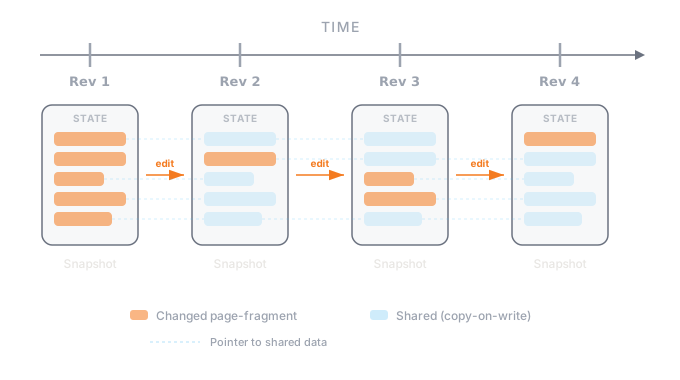
A novel sliding snapshot algorithm eliminates write peaks and storage bloat. Only changed page-fragments are stored per revision.
JSON & XML Native
First-class document store for semi-structured data with temporal XPath axes and JSONiq for navigating in both space and time.
No Write-Ahead Log
An UberPage is swapped atomically as the last action of a commit. No WAL, no background compaction — just efficient, append-only evolution.
Efficient Change Tracking
Changes are tracked efficiently by our custom storage engine.
Flash-Drive Optimized
Designed from scratch for modern SSDs. Log-structured, append-only architecture exploits sequential write patterns and zero seek times.
Query across time
Navigate revision history, find corrections, and diff any two snapshots — all with a single query.
(: Open a resource at a specific point in time :)
let $doc := jn:open('database', 'resource',
                    xs:dateTime('2024-01-15T10:30:00Z'))
for $user in $doc.users[]
where $user.age > 25
return $user
Open any resource at an exact timestamp and query it as it existed at that moment. System time is tracked automatically on every commit.
(: Find items added in this revision :)
for $status in jn:open('db','feed').statuses
where not(exists(jn:previous($status)))
return {
  "revision": sdb:revision($status),
  $status{text, created_at}
}
Use jn:previous() to detect new items — nodes that didn't exist in the prior revision. Combine with jn:next(), jn:future(), and jn:past() to navigate freely.
(: Track a node's evolution across all revisions :)
let $node := sdb:select-item(jn:doc('database','resource'), 1)
for $version in sdb:item-history($node)
return {
  "revision":  sdb:revision($version),
  "timestamp": sdb:timestamp($version),
  "value":     $version
}
Track how a specific node evolves over time. sdb:select-item() finds a node by its stable key; sdb:item-history() returns it from every revision in which it changed.
(: Compute differences between any two revisions :)
sdb:diff('database', 'resource', 1, 5)

(: Returns an XQuery Update statement:
   insert nodes {"name":"Ada"} into sdb:select-item($doc, 23)
   replace value of node sdb:select-item($doc, 7) with "updated"
   delete node sdb:select-item($doc, 14)  :)
Get a precise edit script between any two revisions. SirixDB uses stable node IDs and hashes to compute structural diffs efficiently.
What did you know, and when?
A customer address was entered on March 5. On April 10, you discover it was wrong since February 1. SirixDB lets you correct it while preserving what you believed on March 5.
Two independent time axes make this possible:
Explore your data visually
The SirixDB Web GUI lets you browse databases, run queries, visualize document structure, and travel through revision history — all from your browser.
Dashboard
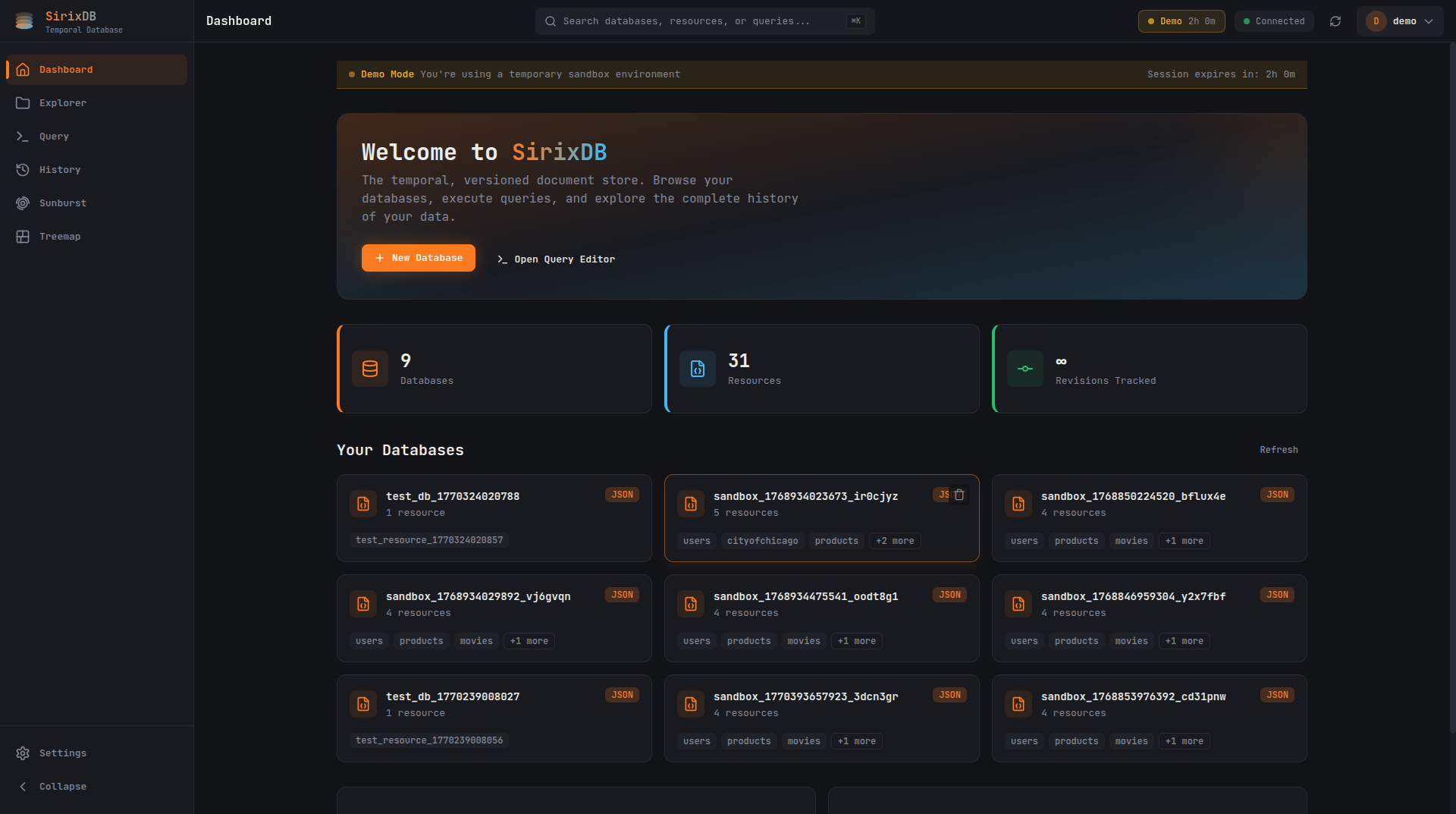
Overview of your databases, resources, and tracked revisions. Create new databases or jump straight into the query editor.
Database Explorer
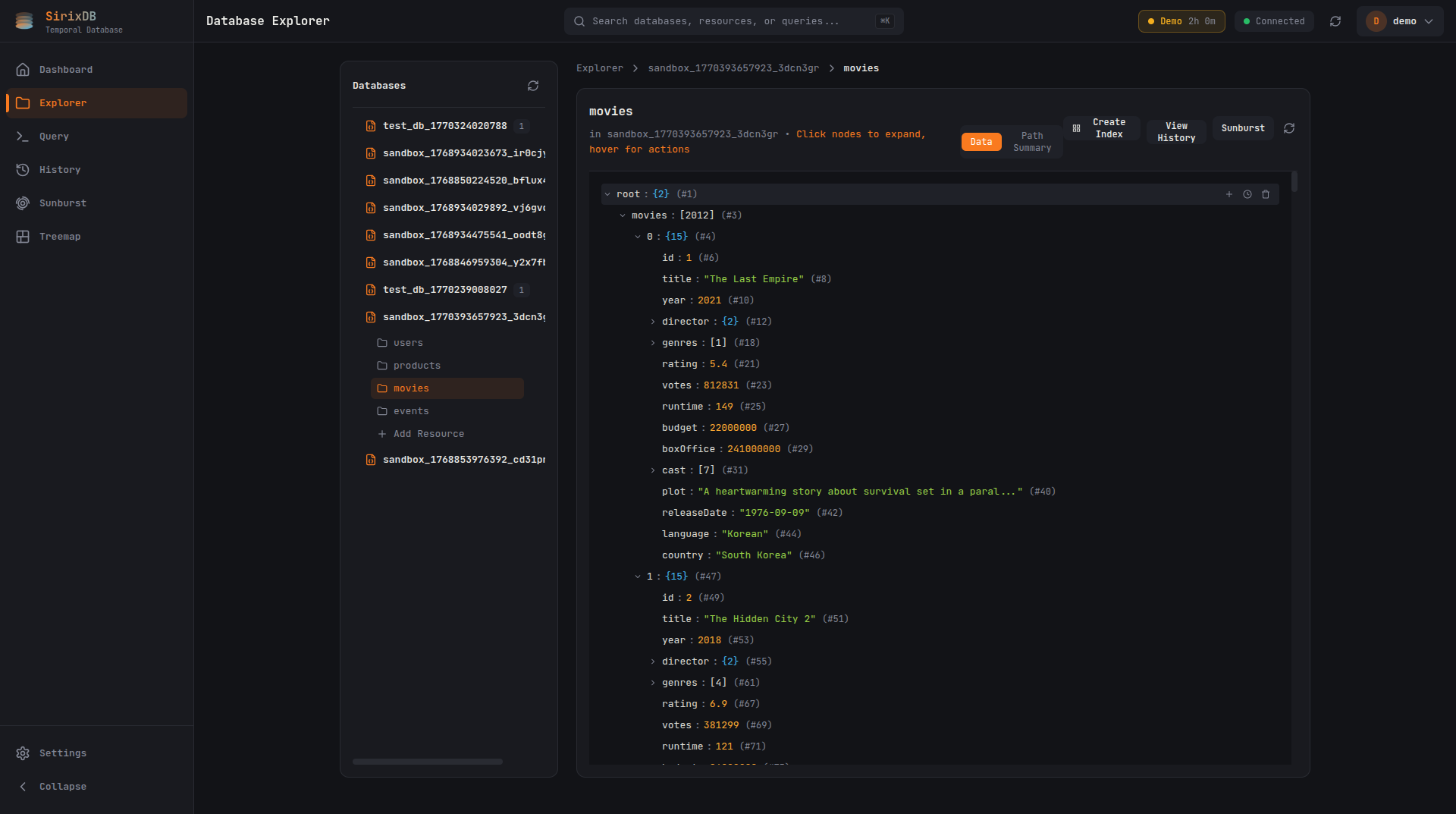
Navigate JSON and XML document trees with expandable nodes. Each node shows its stable ID, type, and value at a glance.
Sunburst Visualization
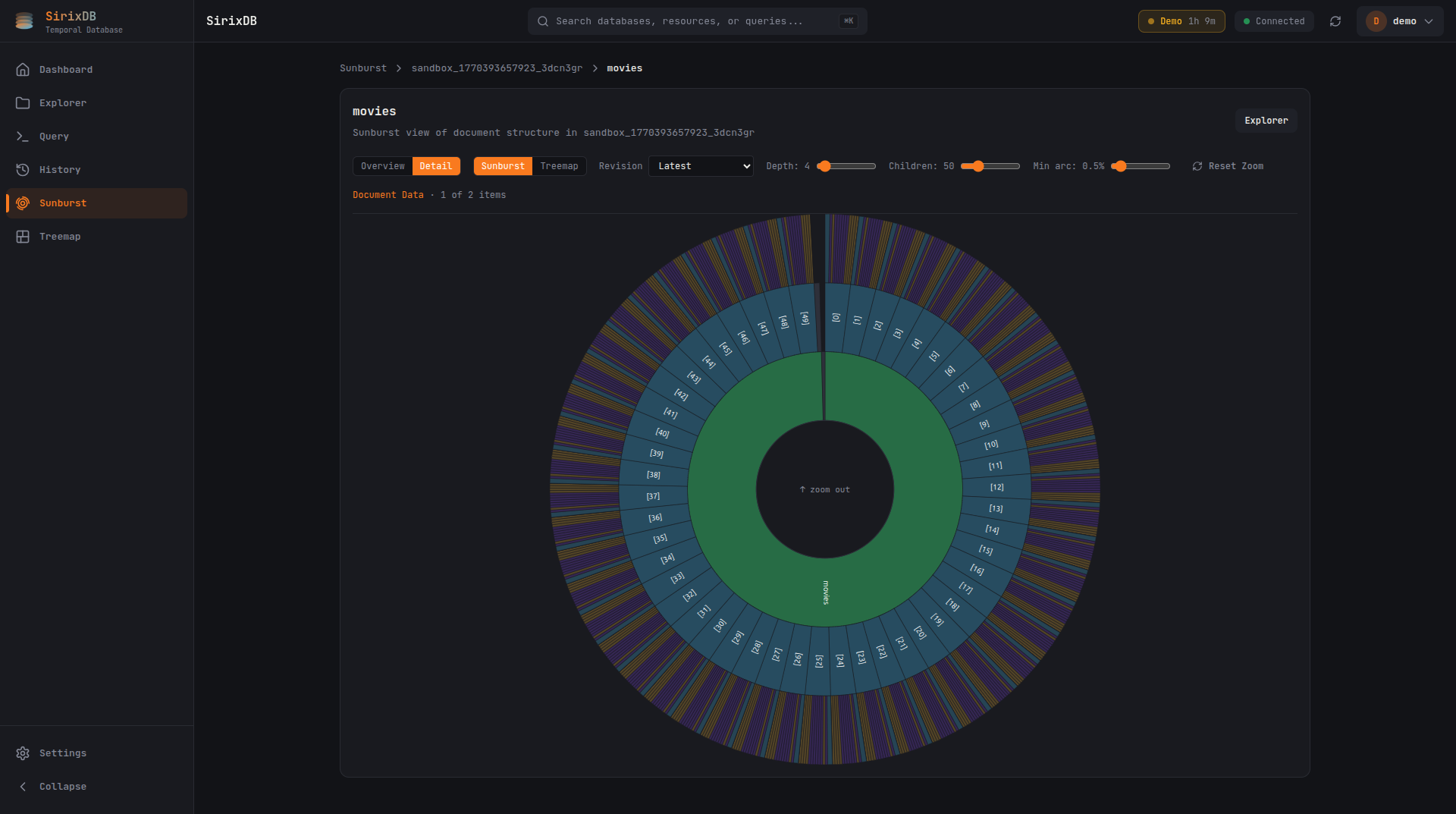
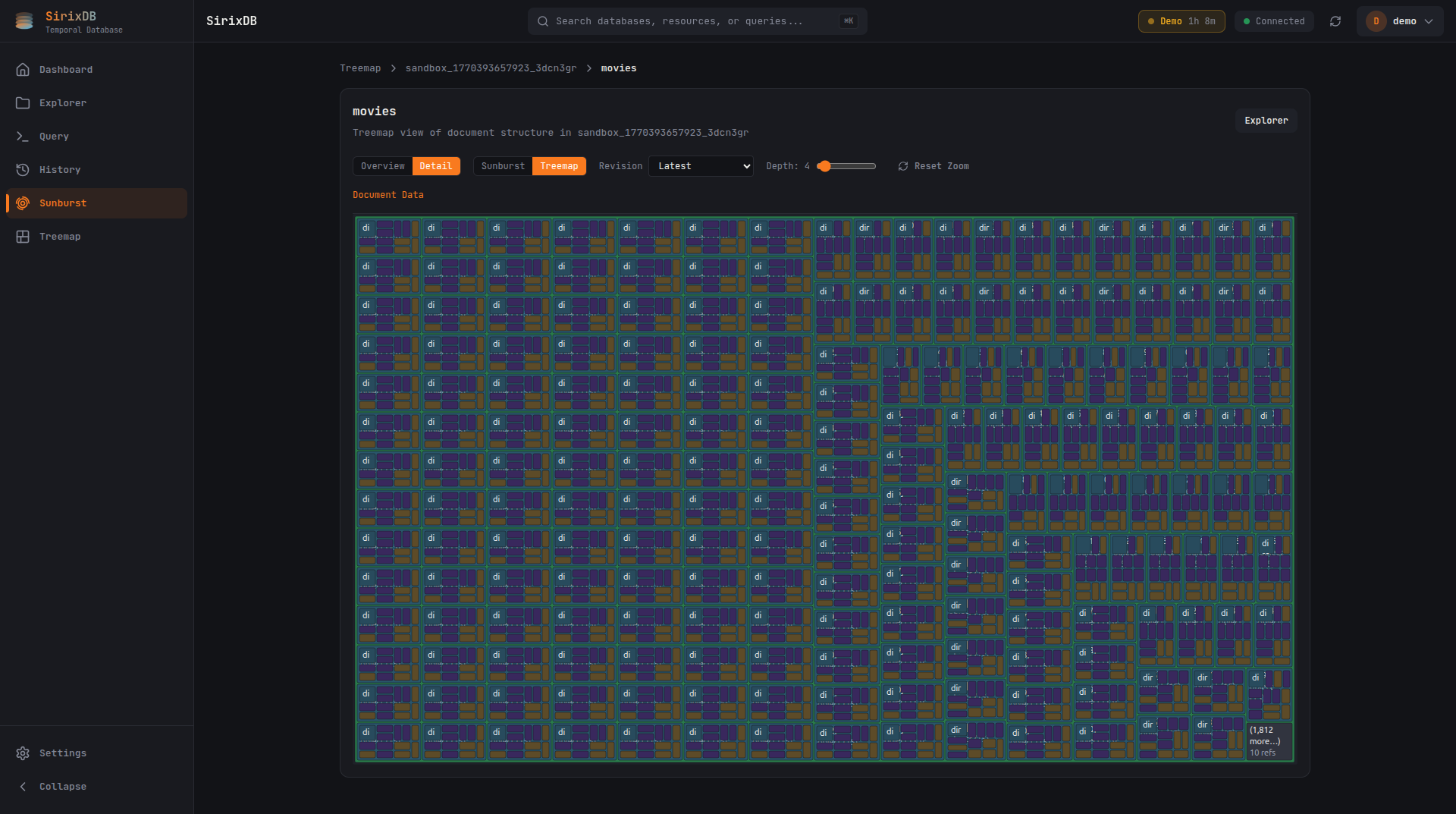
Hierarchical sunburst chart for exploring document structure. Click to zoom into subtrees, adjust depth and minimum arc size.
Treemap View
Space-filling treemap visualization shows document structure at a glance. Hover for details, click to drill into subtrees.
Revision Diff
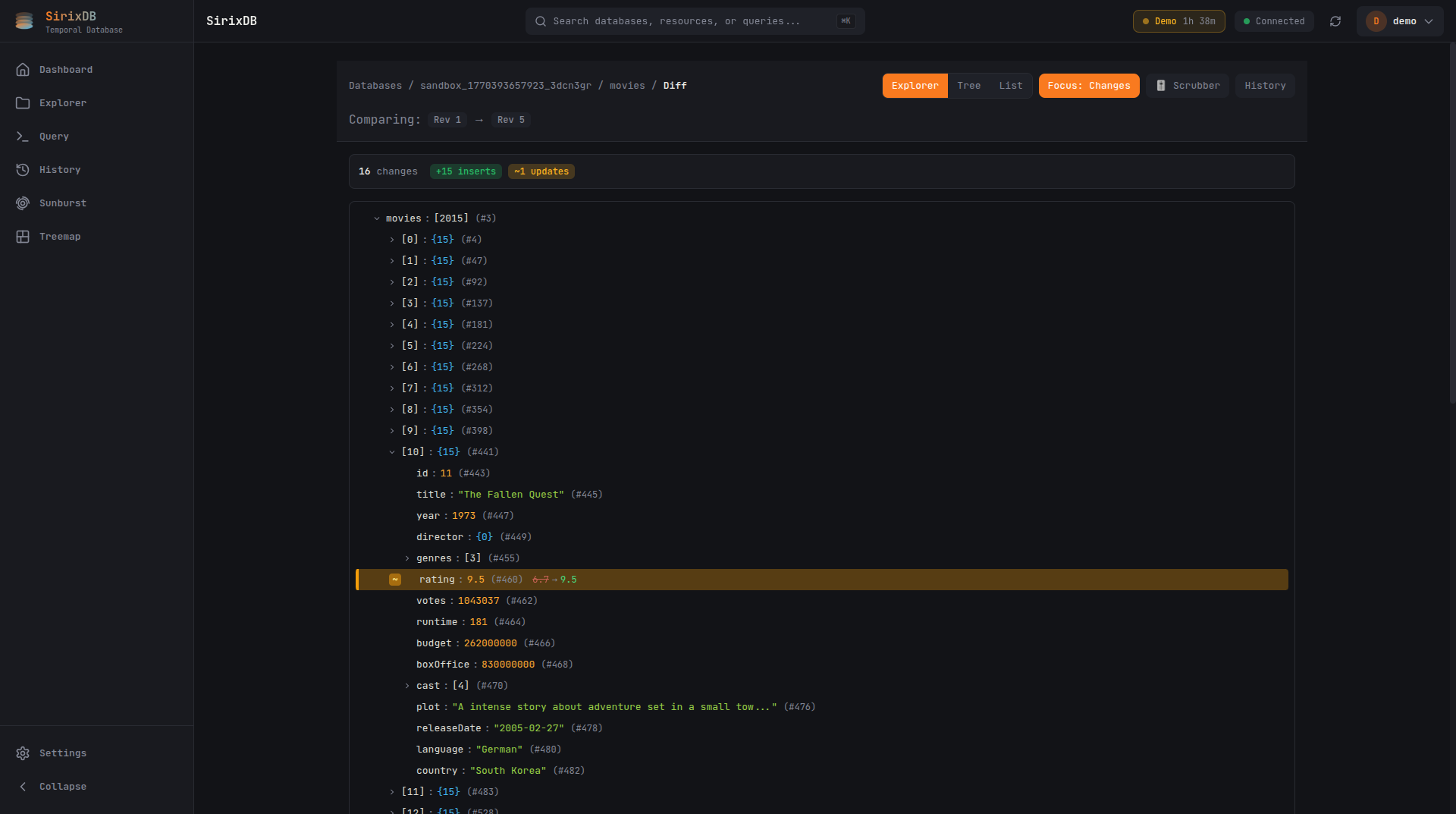
Compare any two revisions side by side. See inserts, updates, and deletes at a glance with Explorer, Tree, and List diff views.
How it works
SirixDB stores data in an append-only, persistent tree structure. Revisions share unchanged pages via copy-on-write — keeping storage minimal.
Lightweight revisions that share unchanged data
Every commit creates an immutable snapshot. New revisions reference unchanged page-fragments from prior versions via copy-on-write pointers — only modified data is written. This eliminates the need for full copies or expensive compaction.
Variable-sized page-fragments in a durable tree
Data, indexes, and revision metadata are stored in a persistent tree structure. Variable-sized page-fragments minimize storage while enabling reconstruction of any revision in linear time. The tree is checksummed for integrity, inspired by ZFS.
Time-travel queries with JSONiq
Open a database at a specific point in time and query across revisions. Find data that was added, modified, or corrected — all in a single query.
let $doc := jn:open('database','resource', xs:dateTime('2019-04-13T16:24:27Z'))
let $statuses := $doc.statuses
let $foundStatus := for $status in $statuses
  let $dateTimeCreated := xs:dateTime($status.created_at)
  where $dateTimeCreated > xs:dateTime("2018-02-01T00:00:00")
        and not(exists(jn:previous($status)))
  order by $dateTimeCreated
  return $status
return {"revision": sdb:revision($foundStatus), $foundStatus{text}}
This query opens a resource at a specific revision timestamp and finds statuses created after Feb 1, 2018 that did not exist in the previous revision. The jn:previous() function navigates the revision history; sdb:revision() returns the revision number.
Powerful APIs
Multiple ways to interact with your temporal data.
REST API
Asynchronous, non-blocking RESTful API built with Vert.x, Kotlin coroutines, and Keycloak for authentication.
XQuery / JSONiq
Extensions to the Brackit XQuery processor with temporal XPath axes and functions for navigating in both space and time.
Transactional Cursor API
Low-level, cursor-based API with standard and temporal XPath axes, filters, and powerful traversal capabilities.
Change Tracking API
Detect and query changes between any two revisions efficiently using stable node IDs and secure hashes stored in the page tree.
Your data has a story.
SirixDB remembers every chapter.
Get started with the documentation or contribute on GitHub.